Guide
How to Register on Shreewin Game
Updated 2026-08-26
You do not create a Shreewin Game account on this website. Open the official client from the Shreewin Telegram channel, tap Register (violet-blue on the lobby we have on file), then finish phone or email, OTP if the form shows it, password, a compulsory invitation code, and the privacy tick. You must be 18+.
This website is not the signup form
shreewingameofficial.com is an independent affiliate guide. It does not take deposits, passwords, or OTPs. Anyone who pastes a “register here” page in chat and then asks for your SMS code is running a collection scam, not helping you sign up.
If you only wanted a one-line overview of the app, start with what Shreewin Game is. This page is the register walkthrough.
Open the official client first
- Open the official Telegram page on this site, then the channel it names: t.me/shreewingamesofficial.
- Use a login or register URL posted in that channel, not a forwarded message from a random group.
- On the lobby, tap Register. On the screens we have, that control is violet-blue. Log in is a separate, gold-orange control — do not mix them up if you do not have an account yet.
The channel is for current client links and download notices. It is not customer support, and it will not ask for your OTP. That rule is spelled out in Shreewin official Telegram links.
What the register screen actually shows
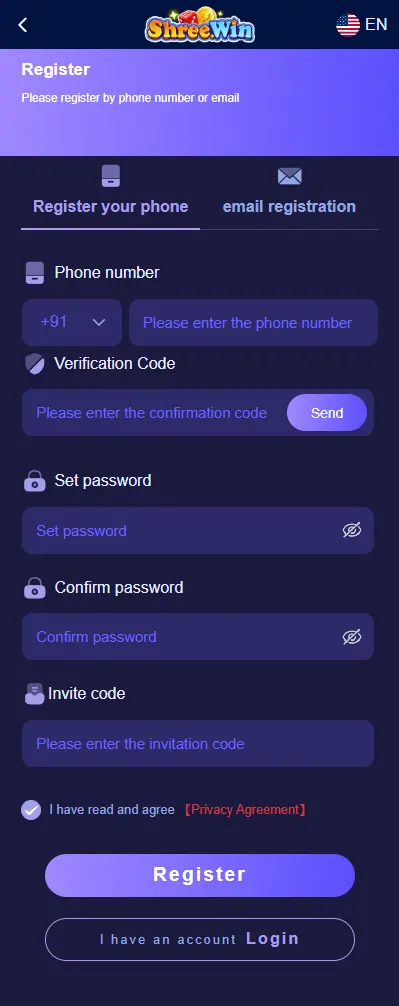
The official form (not a replica on this domain) is built around a few fields. Treat anything extra a stranger tells you to fill — UPI PIN, Aadhaar photo on WhatsApp, “agent KYC fee” — as outside this screen.
- Phone number or email — the form allows either.
- Password and confirm password, with an eye icon to check characters.
- Invitation code — compulsory. This guide does not publish the value.
- A privacy agreement tick-box, then submit.
If a page you opened is missing those controls and instead asks you to “verify wallet” before an account exists, you are not on the register screen.
Phone number or email
For phone: keep the country code that the form already shows. On the Indian build that is +91. Type a number that still receives SMS. Do not borrow a friend’s SIM for five minutes and then lose the line — password reset later goes back to that same identifier.
For email: use an inbox you can open without asking someone else for the password. Login later is picky about method. If you signed up with phone, the login guide wants Phone number, not Email.
OTP
If the form shows a verification field, tap Send, then enter the code that arrives as SMS or email from the operator.
Do not enter a code typed by:
- someone in Telegram DMs
- a “relationship manager” on WhatsApp
- a voice call that claims to be Shreewin support
This guide site cannot see your OTP, cannot reset it, and will not ask for it.
Password
Choose a password you will not paste into a chat to “complete registration.” Confirm it in the second field. Use the eye icon if the mask is hiding a typo.
Do not reuse a password you already posted in a Telegram forward, and do not accept a password a promoter “created for you.” If you cannot get back in later, Forgot password sits on the official login screen — not on this website.
Invitation code
An invitation code is compulsory. Leaving the field empty does not complete signup.
Use a code from the person who referred you, or from a post on the official Telegram channel if they publish one. This site does not list a code.
Do not buy “today’s invite” from a random group, and do not paste a code from an unrelated screenshot. A wrong value typically fails the form.
Daily bonus and team-salary tables on the homepage are operator promo art for after you have an account. They are not a substitute for the invitation field on register.
Privacy tick and submit
Read the privacy agreement the form links to, tick the box, then submit. After that, sign in on the official client.
Ignore anyone who DMs you in the next ten minutes asking to “complete KYC on WhatsApp,” pay a listing fee, or install an APK from a Drive folder. KYC and bank details, when the operator actually asks, happen inside the logged-in app, not in a chat thread.
After you have an account
- Log in on the same official client — phone or email must match what you registered. See how to log in to Shreewin Game.
- If you want the Android package or a home-screen PWA, open Download in the lobby and follow Shreewin APK download. Quick Installation is the PWA path; Complete Installation is the APK. This website does not host
.apkfiles. - To recharge, follow how to add balance. Saving a payout bank is a different screen — how to add a bank account.
- If the operator posts a promo string, redeem it in-app — how to use a Shreewin Game gift code. Do not paste it into the register invitation field.
- Win Go, K3 and 5D are inside the app. Rules and limits can change without this page updating in the same hour.
Real-money play is restricted in some Indian states. Set a loss limit before you deposit. Starting points: responsible gambling. Site rules: terms.
Questions
How do I register on Shreewin Game?
Open the official client from the Telegram channel this site lists, tap Register, then finish phone or email, OTP if the form shows it, password, a compulsory invitation code, and the privacy tick. You must be 18+. There is no signup form on shreewingameofficial.com.
Can I register on shreewingameofficial.com?
No. This domain is an independent guide. There is no /register form here. Signup happens only on official Shreewin Game after you open the current client from Telegram.
Is an invitation code compulsory to register on Shreewin Game?
Yes. The register form will not complete without an invitation code. This guide does not publish a code. Use one from someone you trust, or from official Telegram if they post it — not a paid screenshot from a random group.
Should I register on Shreewin with phone or email?
Use whichever you can still open a week later. Phone signup on the Indian build shows +91. At login you must pick the same method you used at signup or the password will fail even if it is correct.
Shreewin register OTP did not arrive. What now?
Tap Send on the official form and wait for the SMS or email from the operator. Never type a code someone sent you on Telegram, WhatsApp or a phone call. This website cannot resend OTPs or create accounts.
What should I do after I register on Shreewin Game?
Log in on the official client with the same phone or email. Then add balance only in the official wallet if you intend to play, and open Download in the lobby for APK or PWA. This site does not take deposits or host APK files.